AI support chat that answers from your docs, not the internet.
Put an AI agent on your website that resolves questions from your own help articles, cites its sources, and hands off to your team the moment a person is needed.
30-day free trial · no credit card · from $19/seat/mo
Two seconds from question to cited answer
Every message goes through the same careful steps, so the answer is one you'd have written yourself.
Works out what they need
A question, a person, a thank-you or frustration. Follow-ups like “what about on mobile?” become complete questions.
Reads only your docs
It searches your published articles across every help center you choose: product docs, developer docs, sales FAQs.
Writes it and cites it
The answer streams in word by word, with the articles it used listed underneath so customers can read more.
Knows when to stop
If the answer isn't in your docs, it says so and brings in your team. It never guesses.
One inbox where your team and the AI work together.
Watch the AI answer in real time and step in whenever you like. Every teammate sees the conversation, the page the visitor is on, and who they are, in one place.
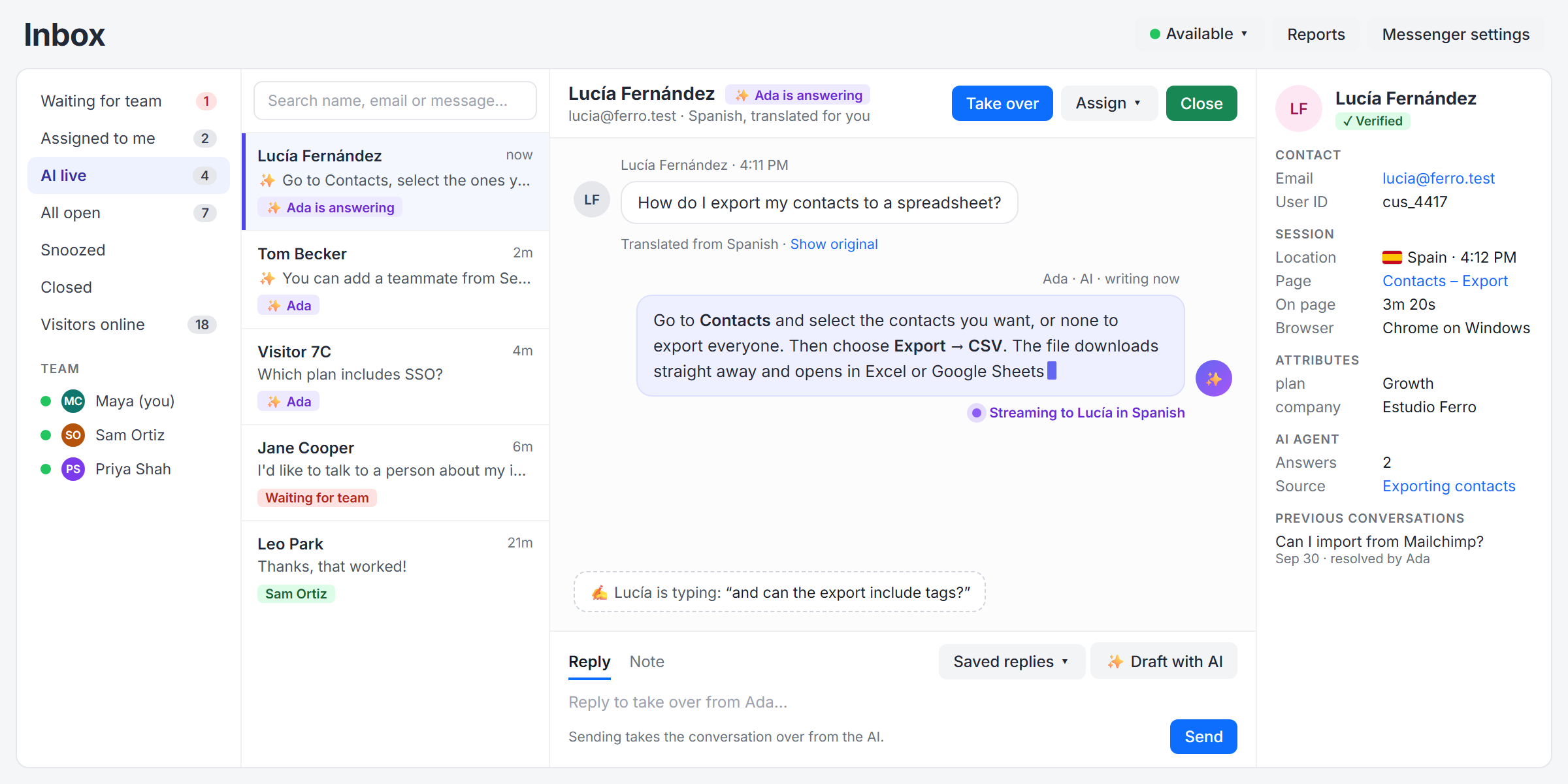
Take over mid-answer
See the AI's reply as it's written and what the visitor is typing. Reply, and the conversation is yours.
Handoffs with context
An AI summary of the conversation so far, the reason for the handoff, and the visitor's history.
Draft with AI
One click writes a reply from your articles, with sources, for you to edit before sending.
Notes, saved replies, files
Brief a teammate privately, insert a canned answer, and send screenshots both ways.
Everything a modern support chat should do. Built on docs that keep getting better.
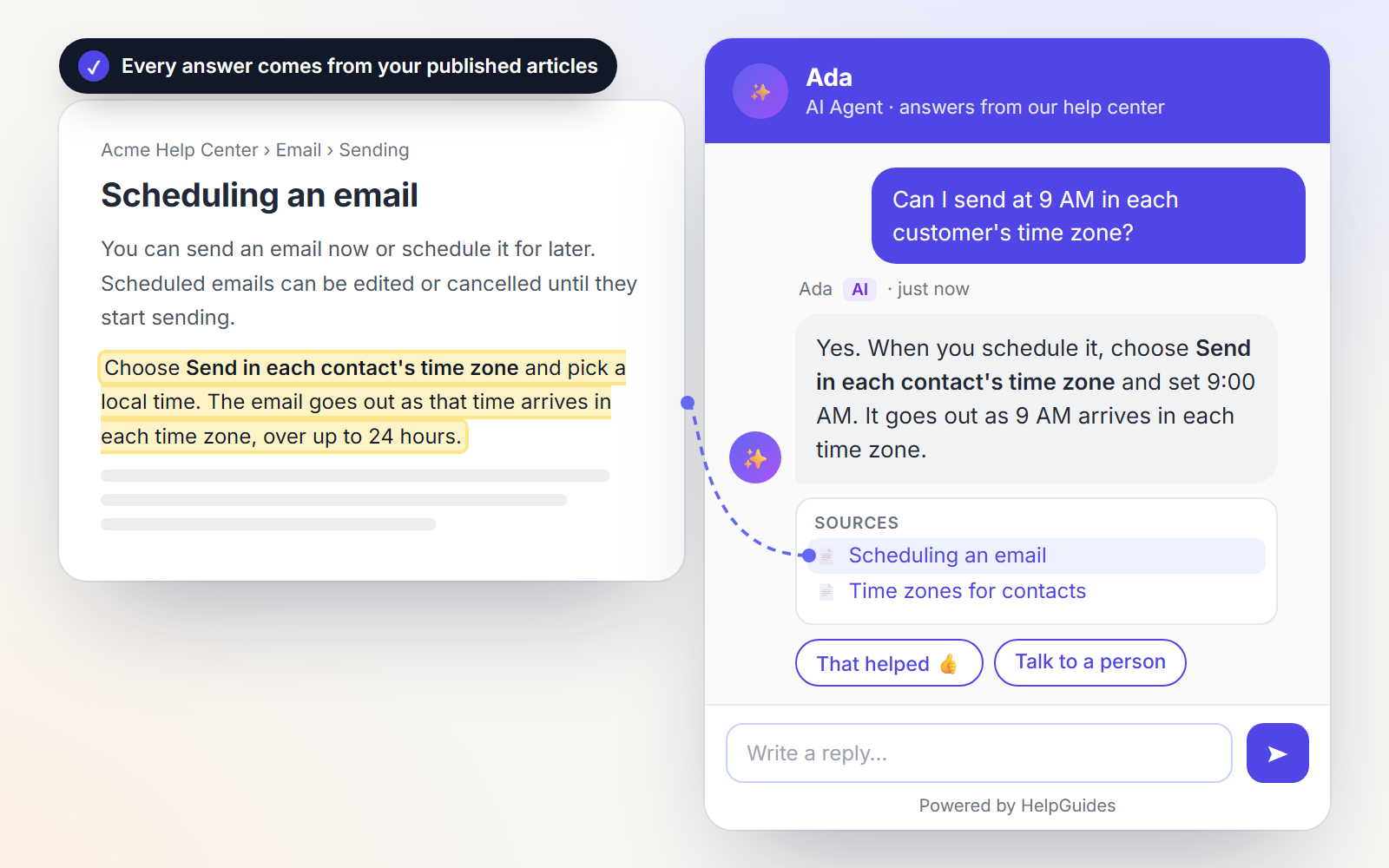
Answers you can trust, because they're yours
The AI answers only from articles you've published, across as many of your help centers as you like. It picks the right one for each question, links to its sources, and asks a quick clarifying question when a question could mean several things.
- Mark internal knowledge bases as reference only: the AI uses them without showing the links
- Question rules for topics that always go to a person, or always get the same answer
- A Test tab to check answers before you go live
Speak every customer's language
Customers write in their own language. Your team reads every message in theirs, and replies are translated back before they're sent. The AI answers in the customer's language from the start.
- The customer's language is detected automatically, and follows them if they switch
- Each teammate chooses the language they work in
- Proactive greetings appear in each visitor's own language
- The original is always one click away, and notes are never translated
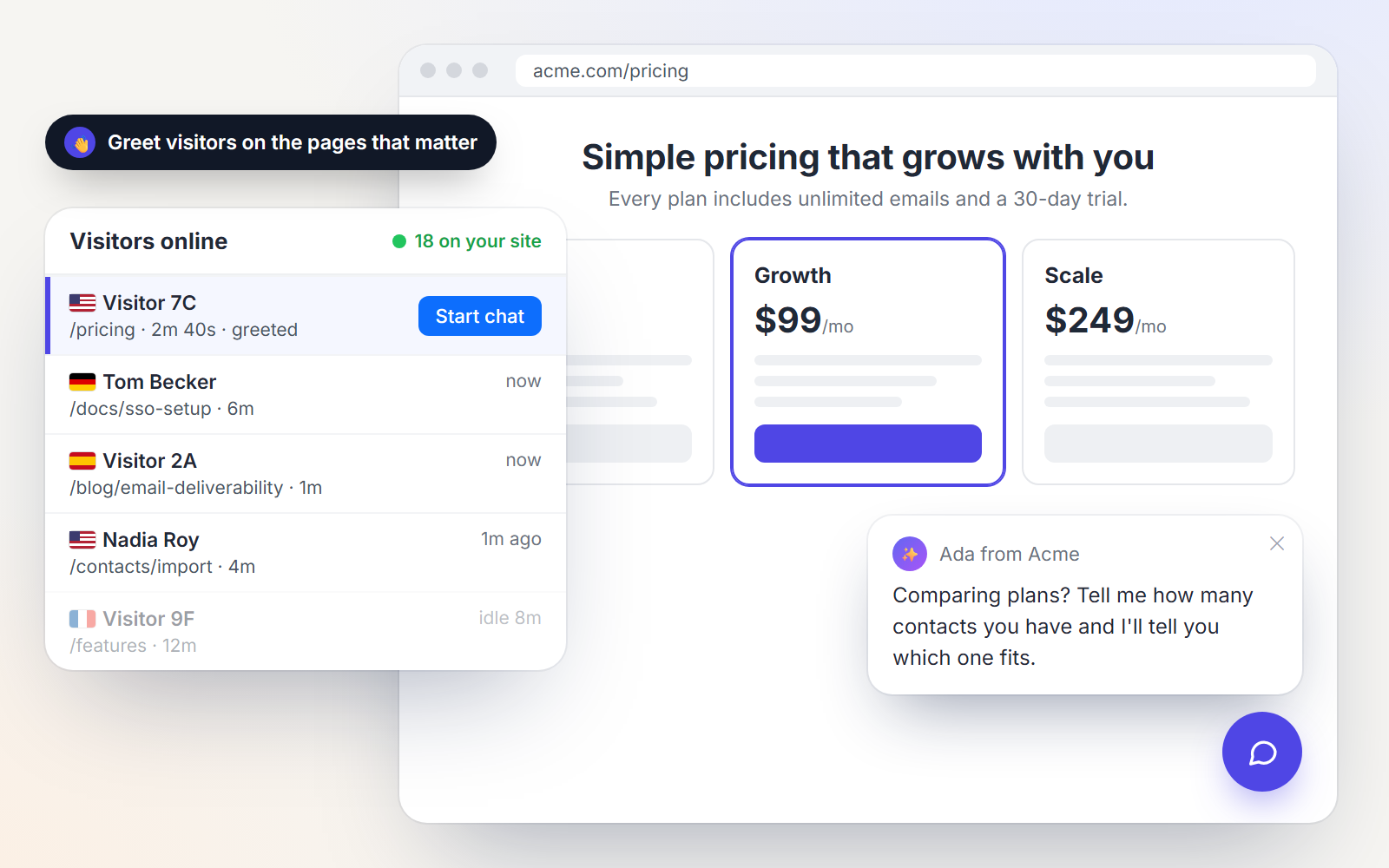
Start the conversation on the pages that matter
Greet visitors on your pricing, signup or blog pages with a message written for that page. See who's on your site right now, which page they're reading, and start a chat with them yourself.
- Page rules with wildcards, delays and how often to show
- Messages that use the page's title, and answers that use the article they're reading
- Shown in the visitor's own language, translated automatically
- Feature your newest articles on the messenger's home screen
Live answers from your own systems
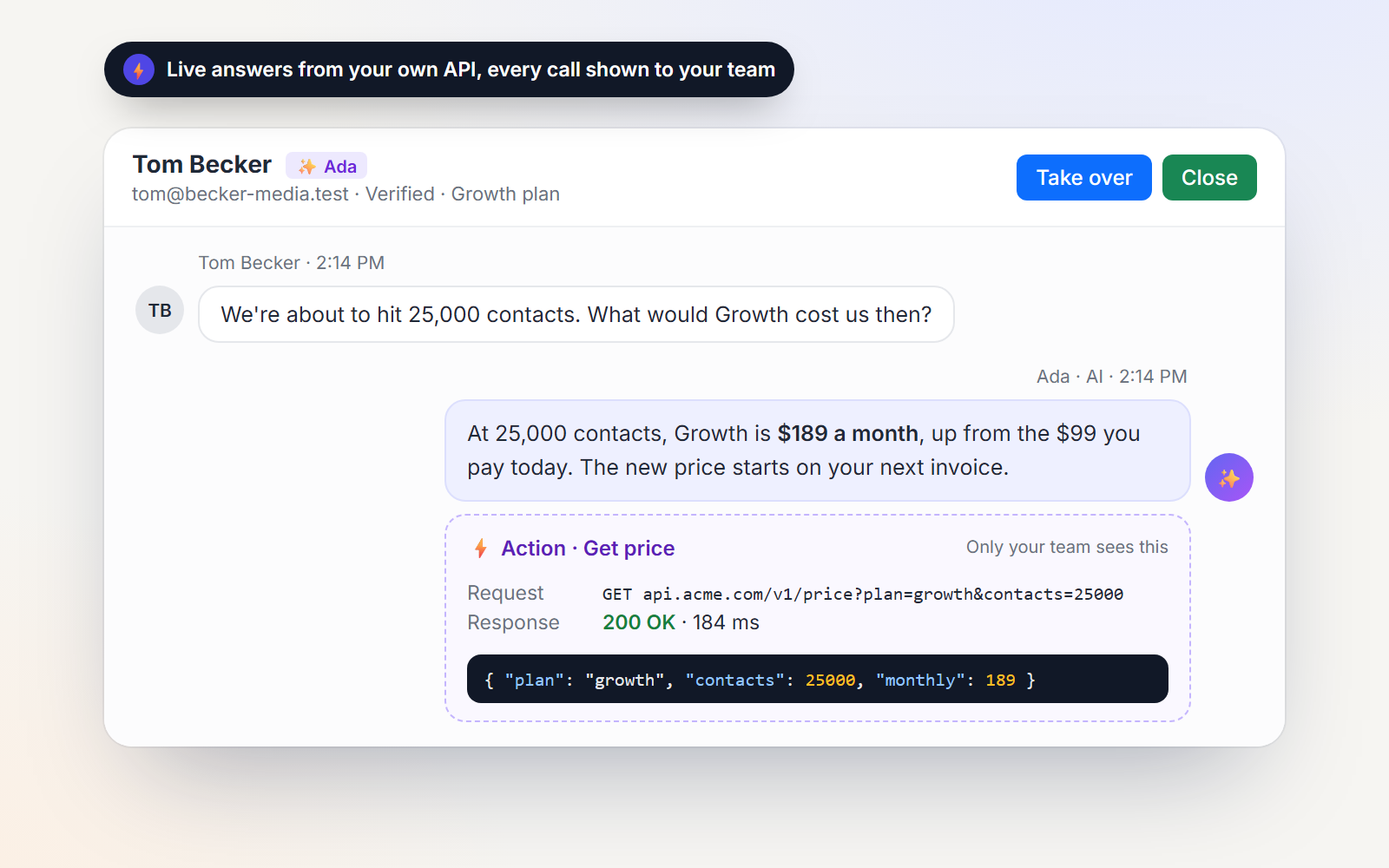
Actions let the AI call your APIs while it answers: today's price for 5,000 contacts, the status of an order, a signed-in customer's plan. You decide what it can call, and every call is shown to your team.
- Identity verification, so signed-in customers only ever see their own account
- Test each action from the settings screen before switching it on
- Route buying conversations to your sales team, and send them to DailyStory as leads
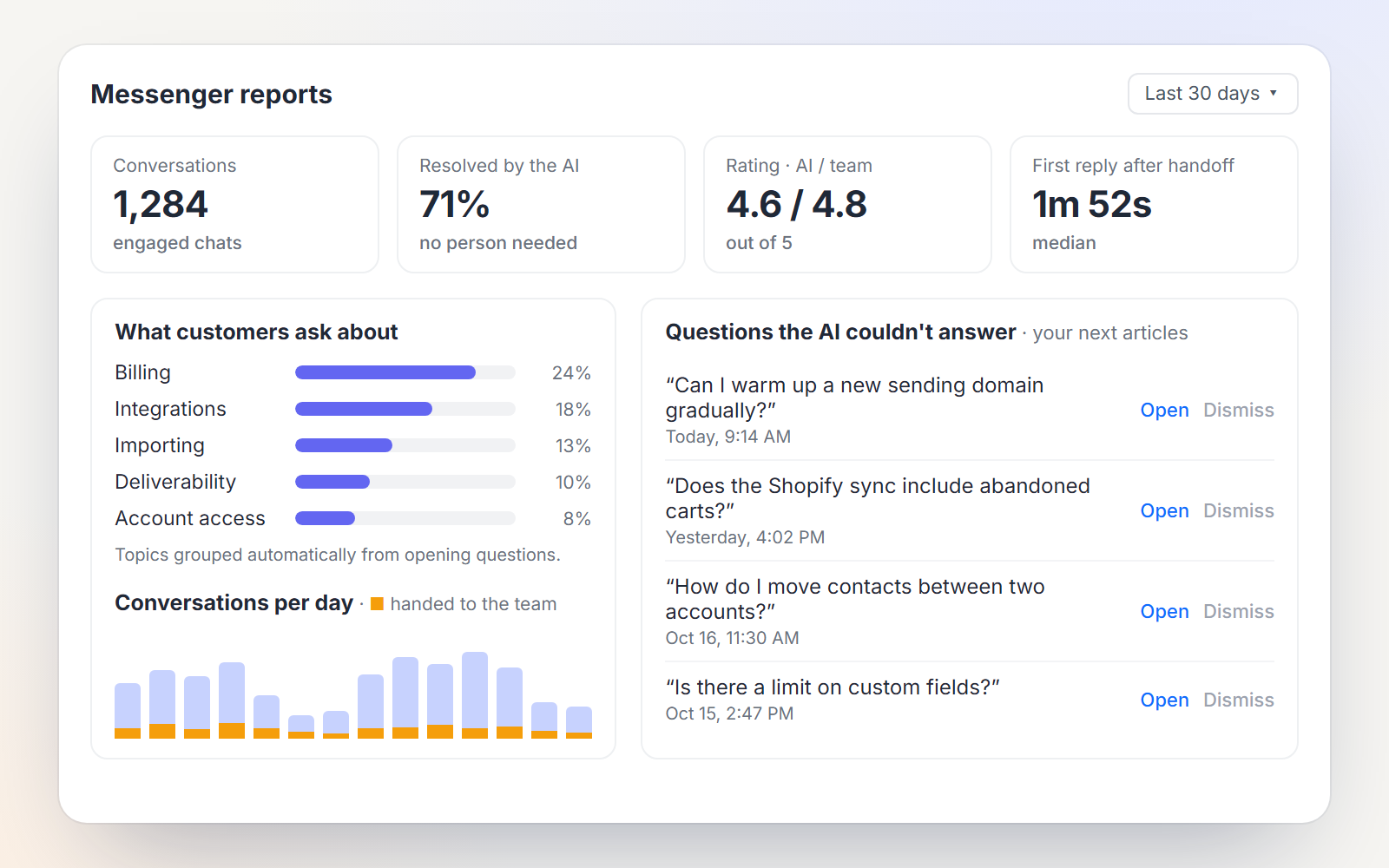
Every unanswered question becomes your next article
Questions the AI couldn't answer are collected in your customers' own words. Write the missing article, and the AI answers it next time. Reports show what's working and where your team is needed.
- Resolution rate, ratings for the AI and your team, and response times
- Topics grouped automatically from what customers ask
- Busy-hour heatmaps, a staffing plan, and a weekly summary email
The details that make it work day to day
Slack and email alerts
Each conversation is one Slack thread, routed to the right team: support, sales, billing.
An app for your phone
Install the inbox on iPhone or Android and get push alerts for new chats and handoffs.
Support hours
Your schedule, time zone and holidays, with honest “back Monday” wording when you're away.
Email follow-up
Visitors who leave get your team's replies by email, with a link back to the conversation.
Help center inside the chat
A Help tab where visitors browse and search your articles without leaving the page.
Files and images
Screenshots and documents both ways, stored privately and shared through signed links.
Your brand
Your colors, team photos, AI agent name and logo, greeting and position on the page.
Abuse protection
Rate limits on every visitor, and one-click blocking of abusive IP addresses.
Privacy controls
Internal notes never reach visitors, and you choose how long conversations are kept.
You're looking at it.
The chat in the corner of this page is HelpGuides Messenger, answering from our own documentation. Ask it anything about HelpGuides.
Built for the questions your team answers every day
Set it up once for your customers. It answers from your docs, in your brand, on your site.
SaaS support
Resolve the how-do-I questions and hand the account-specific ones to your team with the context they need.
Developer & API docs
Answer integration questions from your reference, with links straight to the right endpoint.
Sales questions
Greet visitors on pricing pages, answer what you've published, and route buying questions to sales.
Global customers
Support customers in their own language without hiring for every one of them.
Pay only when the AI actually helps
Seats for the people who write your docs and work the inbox. Visitors and chat users are always free.
100 AI resolutions a month included
1,000 resolutions · custom domain · MCP
5,000 resolutions · SSO · audit logs
Beyond your allowance, $0.20 per resolved chat, compared with $0.99 at Intercom Fin. Never charged for handoffs, “not helpful” answers, or questions your docs couldn't answer.
Questions about HelpGuides Messenger
Will the AI make things up?
No. It answers only from the articles you publish in HelpGuides and links to the ones it used. When your articles don't cover a question, it says so and offers your team instead of guessing.
What happens when the AI can't help?
The conversation goes to your inbox. It hands off when a visitor asks for a person, seems frustrated, or asks something your docs don't answer, and your team gets a summary of the conversation so far. Outside support hours, it collects an email so you can follow up.
How do I add it to my website?
Paste one snippet into your site, whether it's WordPress, Webflow, a custom app or anything else. It works on any page, follows visitors from page to page, and can recognize signed-in customers with identity verification.
Does it work in other languages?
Yes. The AI answers in the customer's language, and with translation on, your team reads every conversation in its own language and replies in it. Replies are translated before they're sent, across more than 40 languages.
Can it look up information in our own systems?
Yes. Actions let the AI call your REST APIs for live information, such as a price for a given plan or the status of a signed-in customer's own account. Every call is shown to your team.
How does pricing work?
You pay per seat for the people who write docs and work the inbox. Visitors and chat users are always free. Each plan includes AI resolutions every month, and beyond that you pay $0.20 per resolved chat. Handoffs, "not helpful" answers and questions your docs couldn't answer are never charged.
Can my team use it from their phones?
Yes. The inbox installs as an app on iPhone and Android straight from the browser, with push notifications for new chats and handoffs. No app store needed.
Where is our data kept, and for how long?
Conversations are stored in HelpGuides, and you choose how long they're kept, from 90 days to forever. Visitor files are stored privately, internal notes never reach visitors, and you can block abusive IP addresses.
Answer every customer, in every language.
30 days free · no credit card · live in an afternoon