Documentation That AI Actually Works With
HelpDocs helps you write articles. HelpGuides makes your documentation a living resource that AI assistants like Claude can search, create, and update — so your knowledge base works as hard as your team does.
30-day free trial · no credit card · price calculator
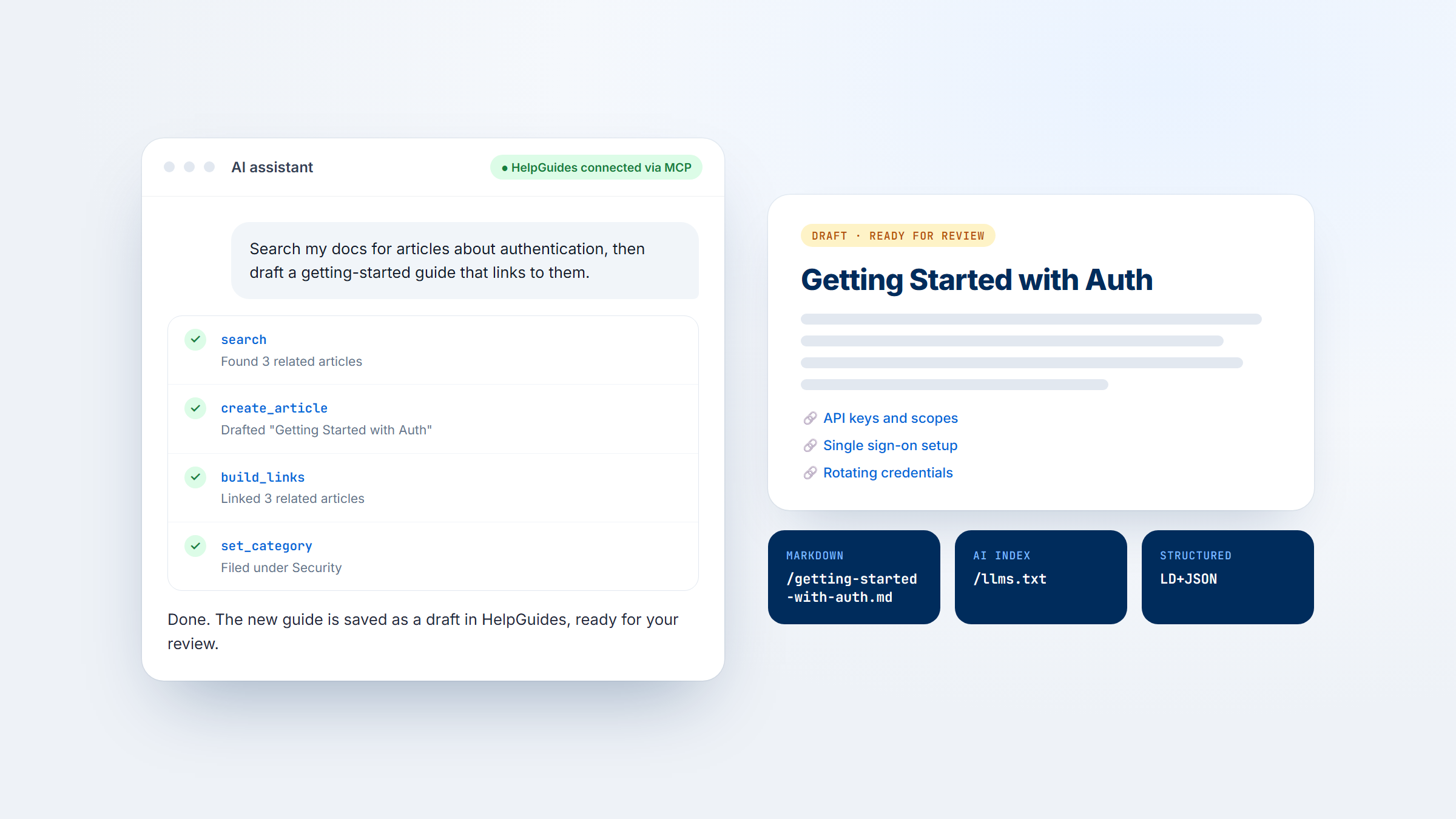
AI Publishes For You
Claude connects directly to HelpGuides via MCP to draft, edit, and update your documentation. No copy-pasting from chatbots.
AI Finds Your Content
Auto-generated llms.txt and ai.txt mean ChatGPT, Copilot, and Perplexity cite your docs — not your competitors'.
Future-Proof Architecture
Markdown URLs, LD+JSON, and AI crawler standards ensure your content is visible to every AI platform — today and tomorrow.
Claude Doesn't Just Summarize — It Publishes
HelpGuides is the only documentation platform with native Model Context Protocol (MCP) support. Connect Claude once, and it becomes a documentation team member that can search, draft, and update articles directly.
AI That Creates and Maintains Your Docs
Tell Claude to "create a draft article about our new API endpoint" and it writes the article, links to related content, and saves it as a draft in HelpGuides — ready for your review. No switching tabs, no copy-pasting.
HelpDocs' AI features help you rewrite existing text or generate outlines. But the AI can't access your knowledge base structure, can't create articles, and can't update published content.
HelpGuides
- ✓ Search docs from any Claude conversation
- ✓ Draft new articles with a prompt
- ✓ Update existing articles by URL
- ✓ Works in Claude.ai, Claude Code, and Claude Desktop
- ✓ Open MCP standard — not a proprietary lock-in
HelpDocs
- ~ Draft articles from outlines
- ~ Rewrite for clarity
- ~ Generate alt text
- ✗ AI only works inside HelpDocs editor
- ✗ Cannot search or update docs from external AI tools
Works Everywhere Claude Does
HelpGuides connects to Claude.ai, Claude Code, and Claude Desktop through the open MCP standard. Your documentation becomes available in every surface where your team already works — no context-switching required.
HelpDocs' AI features only work inside the HelpDocs editor. You can't ask an AI assistant to search your knowledge base from a conversation, update an article while writing code, or draft documentation from your desktop.
Built for AI Discovery, Not Just Google
HelpDocs optimizes for search engines. HelpGuides optimizes for search engines and AI platforms — so your documentation shows up in ChatGPT, Copilot, Perplexity, and Claude answers.
Your Content, Structured for LLMs
Every article you publish in HelpGuides is automatically available as a clean Markdown URL. AI models parse Markdown more efficiently than HTML, which means more accurate citations and fewer hallucinations when AI platforms reference your docs.
HelpGuides auto-generates your llms.txt file — the emerging standard that tells AI crawlers which content matters most. Combined with ai.txt and structured LD+JSON, your knowledge base becomes a first-class data source for AI systems.
HelpGuides
- ✓ Auto-generated llms.txt with priority ranking
- ✓ ai.txt for AI crawler permissions
- ✓ Every article accessible as Markdown
- ✓ Structured LD+JSON on every page
- ✓ OpenAPI.json for API documentation
- ✓ Semantic HTML + SEO optimization
HelpDocs
- ✓ SEO-optimized templates
- ✓ PageSpeed & accessibility scores
- ✗ No llms.txt generation
- ✗ No ai.txt support
- ✗ No Markdown URL access
- ✗ No LD+JSON auto-generation
Real Version Control. Not Just Save & Pray.
HelpGuides gives you working copies, revision history, and rollback — so your team can iterate without risking what's live.
Edit Without Fear
Create a working copy of any published article, make your changes, and promote it when ready. Every published revision is saved, and you can roll back at any time. Independent reviewers have noted that HelpDocs lacks version control entirely.
HelpGuides also tracks content freshness automatically — so you know which articles are going stale and can assign team members to review them before they become a liability.
HelpGuides
- ✓ Working copies — edit without affecting live content
- ✓ Automatic revision history on every publish
- ✓ One-click rollback to any previous version
- ✓ Content freshness metrics and alerts
- ✓ Scheduled review reminders for stale content
HelpDocs
- ✗ No version control
- ✗ No working copy workflow
- ~ Basic "last updated" timestamps
- ~ Content age stats available
APIs, Markdown, and MCP — All Native
HelpGuides was built for teams that think in APIs and automation, not just WYSIWYG editors.
A Platform Developers Actually Want to Use
HelpGuides offers both public and secure APIs for managing everything in the platform. Every article is available as Markdown. And with MCP endpoints, you can integrate your documentation into any AI-powered workflow — from Claude to custom agents.
HelpDocs offers Handlebars-based templating and a block editor, which works well for non-technical teams. But it doesn't expose your content through Markdown URLs or support AI-native protocols like MCP.
HelpGuides and HelpDocs, feature by feature
Including where HelpDocs does more.
| HelpGuides | HelpDocs | |
|---|---|---|
| AI article creation via Claude (MCP) | ✓ Native | ✗ Not available |
| AI article updates via Claude | ✓ Native | ✗ Not available |
| AI works across Claude surfaces | ✓ Claude.ai, Code, Desktop | ✗ Editor only |
| llms.txt auto-generation | ✓ Built-in | ✗ Not available |
| ai.txt support | ✓ Built-in | ✗ Not available |
| Markdown URL access | ✓ Every article | ✗ Not available |
| Structured LD+JSON | ✓ Auto-generated | ✗ Not available |
| Version control & rollback | ✓ Full revision history | ✗ Not available |
| Working copies | ✓ Built-in | ✗ Not available |
| Content freshness tracking | ✓ With review alerts | ⚠ Basic age stats |
| SEO optimization | ✓ Semantic HTML | ✓ Strong (100% score) |
| Custom branding & domains | ✓ All plans | ✓ All plans |
| Search analytics | ✓ With gap analysis | ✓ Search intelligence |
| Developer API | ✓ Public + Secure APIs | ✓ API available |
| Distraction-free editor | ✓ Block editor | ✓ Block editor |
| User feedback on articles | ✓ Built-in | ✓ Built-in |
HelpDocs is a trademark of its respective owner. HelpGuides isn't affiliated with or endorsed by it. All comparisons →
Ready for Documentation That Works With AI?
Start your free 30-day trial. No credit card required. See why teams are switching from HelpDocs to the AI-ready documentation platform.